Best Smartphone Telescope Adapter 2026: Capture the Moon and Planets With Your Phone
Telescope Advisor Logo Telescope Advisor
Smartphone attached to a telescope eyepiece — the simplest way to start astrophotography

Buying Guide · Beginner Astrophotography 2026

Best Smartphone Telescope Adapter 2026: Start Capturing the Night Sky With Your Phone

You do not need a $2,000 DSLR to start astrophotography. A $20–$50 smartphone adapter turns the phone in your pocket into a powerful camera for the Moon, planets, and even bright deep-sky objects. This guide ranks the best smartphone telescope adapters for 2026, from simple spring-clip holders to premium adjustable mounts that work with any eyepiece and any phone.

$15–$60

Price Range

Universal

Fits Most Phones

Moon & Planets

Best Subjects

Instant Setup

No Tools Required

By Telescope Advisor Editorial Team Published: Updated: Editorial Standards

Quick Answer: What Is the Best Smartphone Telescope Adapter?

The Celestron NexYZ Universal Smartphone Adapter is the best all-around choice in 2026. Its three-axis adjustment system lets you perfectly align your phone's camera with any eyepiece from 20mm to 80mm diameter, the spring-loaded grip holds phones up to 3.5 inches wide securely, and the aluminum construction is stable enough to prevent the camera shake that ruins afocal images. For a budget option, the Svbony SV130 delivers solid performance at half the price. A smartphone adapter is the cheapest way to start astrophotography — and the Moon through a telescope, captured with your phone, is a genuinely thrilling first image.


🔭

Not sure which telescope actually fits your goals?

Answer 5 quick questions about your budget, observing targets, and experience level — our Telescope Finder Tool recommends a specific model in under 2 minutes.

Find My Telescope →

How Smartphone Telescope Adapters Work

A smartphone telescope adapter uses a technique called afocal photography — the phone's camera lens is held steady over the telescope eyepiece, and the phone captures the image projected by the eyepiece. The telescope acts as a giant telephoto lens for your phone camera.

The adapter's job is threefold: hold the phone securely in place, align the phone's camera lens precisely with the center of the eyepiece, and prevent vibration during capture. Cheap adapters fail at the last two tasks — the phone shifts, the camera off-centers, and the resulting image is a blurry disappointment.

What you can capture with a smartphone adapter:

  • The Moon — by far the best subject. Craters, maria, and terminator detail are spectacular through any telescope. The Moon is bright enough that even budget phone cameras produce sharp images.
  • Planets — Jupiter's cloud bands and four Galilean moons are achievable. Saturn's rings are identifiable but small. Venus's crescent phase is striking.
  • Bright deep-sky — The Orion Nebula (M42) is just barely possible with a phone in Night Mode. Andromeda Galaxy (M31) shows as a bright core. Both require a stable mount and dark skies.
  • Solar (with filter) — Sunspots and the Moon during a solar eclipse are excellent phone targets.
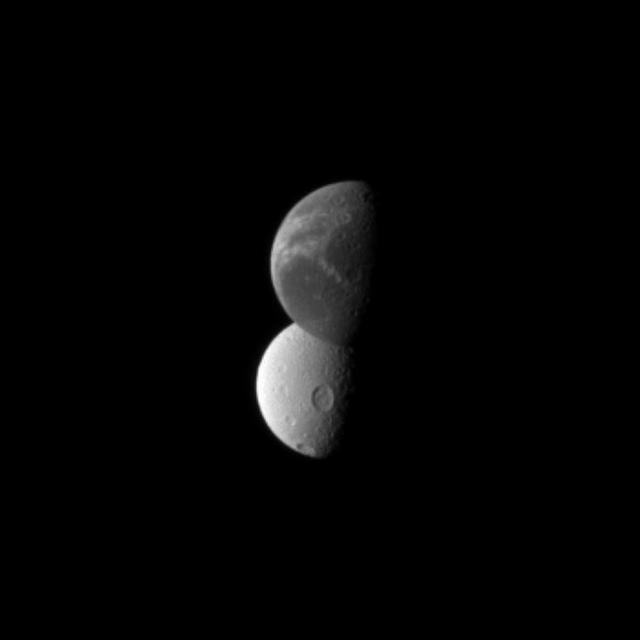
The Moon's surface — the best and easiest target for smartphone astrophotography through a telescope

The Moon — The Perfect First Phone Capture

The Moon is bright enough for any phone camera to capture through a telescope. With a steady adapter, even budget smartphones can reveal craters, maria, and the terminator in sharp detail. Credit: NASA.

Key compatibility check before buying

Most universal adapters claim to fit "all smartphones" but have practical limits. Check your phone's width: most adapters accommodate phones 55mm to 90mm wide (2.2 to 3.5 inches). Large "Pro" model phones with cases may exceed this range. Also check your eyepiece diameter: standard 1.25-inch eyepieces measure about 35mm at the top, but some wide-field eyepieces have larger barrels. Measure before you buy.

Quick Comparison: Best Smartphone Adapters

Adapter Phone Width Range Eyepiece Range Adjustable Axes Material Best For
Celestron NexYZ 55–90mm 20–80mm 3 (X, Y, Z) Aluminum Best overall — premium build
Svbony SV130 55–85mm 25–60mm 2 (X, Y) Plastic + metal Best budget option
Gosky Universal 55–95mm 25–70mm 2 (X, Y) Plastic + rubber Best value — good enough for most


1. Celestron NexYZ Universal Smartphone Adapter — Editor's Pick

Editor's Pick — Best Smartphone Adapter
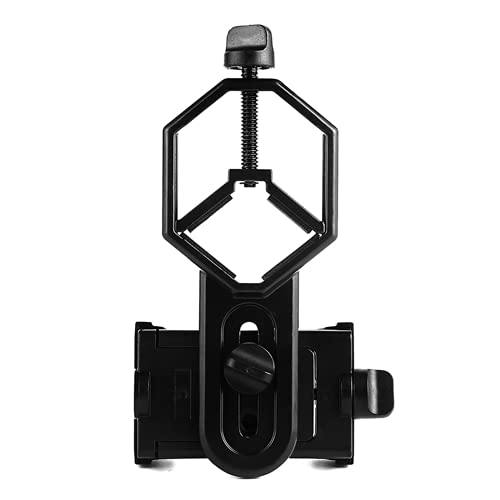
Celestron NexYZ Universal Smartphone Adapter — three-axis precision adapter for smartphone astrophotography

Celestron NexYZ Universal Smartphone Adapter

3-axis adjustment Fits phones up to 90mm Aluminum construction Eyepieces 20–80mm

The Celestron NexYZ is the most sophisticated smartphone adapter on the market — and the one that consistently produces the best results. Its key innovation is three-axis adjustment (X, Y, and Z axes), which lets you independently center the phone's camera over the eyepiece, adjust the height to match the eye relief, and lock everything in place without the phone drifting.

The aluminum body is significantly more rigid than plastic adapters, which almost eliminates the vibration that ruins afocal images. The spring-loaded phone clamp holds phones from 55mm to 90mm wide — covering everything from an iPhone SE to a Samsung Galaxy Ultra with a case. The eyepiece clamp accommodates 20mm to 80mm diameter eyepieces, covering virtually all 1.25-inch and most 2-inch eyepieces.

Real-world results: With the NexYZ and an iPhone 15 Pro on an 8-inch Dobsonian at 48×, lunar images show crisp crater detail and the terminator is sharp. Jupiter shows the two main equatorial belts and three to four Galilean moons. Saturn's rings are clearly separated from the planet. These are not Hubble images — but they are genuinely impressive for a phone-and-telescope combination and easily good enough for social media sharing.

  • Three-axis adjustment for perfect alignment
  • Rigid aluminum — minimal vibration
  • Fits largest phones and eyepieces
  • Quick-release phone clamp
  • More expensive than basic adapters
  • Heavier than plastic alternatives
View on Amazon →

Affiliate link — we may earn a small commission at no extra cost to you.

2. Svbony SV130 Smartphone Adapter — Best Budget

Svbony Universal Cell Phone Adapter Mount — budget-friendly smartphone adapter for telescopes

Svbony Universal Cell Phone Adapter Mount

2-axis adjustment Fits phones up to 85mm Lightweight design Under $20

The Svbony SV130 proves you do not need to spend a lot to get solid results. At under $20, it is the best entry-level smartphone adapter for beginners who want to try afocal astrophotography without a significant investment. The two-axis adjustment (horizontal and vertical) centers the phone over the eyepiece, and the spring-loaded clamp holds the phone securely.

The SV130 works best with smaller phones (up to 85mm width) and standard 1.25-inch eyepieces. The plastic construction is lighter than the NexYZ but less rigid, meaning you need to be more careful about vibration — use a 2-second shutter delay or a Bluetooth remote trigger to avoid shake. For the Moon — by far the most rewarding first target — the SV130 delivers results that are 90% of what the NexYZ can do for one-third the price.

View on Amazon →

Affiliate link.

3. Gosky Universal Smartphone Adapter — Best Value

Gosky Universal Spotting Scope Phone Adapter — precision 3-axis alignment for digiscoping

Gosky Universal Spotting Scope Phone Adapter

2-axis adjustment Fits phones up to 95mm Rubber-lined grip Includes remote shutter

The Gosky Universal Smartphone Adapter is a strong middle-ground option that includes a Bluetooth remote shutter — a feature that noticeably improves image sharpness by eliminating the need to touch the phone during capture. The adapter fits phones up to 95mm wide (including most large phones with cases) and eyepieces from 25mm to 70mm diameter.

The rubber-lined phone grip is gentler on phone edges than the Svbony's harder plastic, and the two-axis adjustment is smooth and holds position well. The main compromise vs the NexYZ is the plastic construction (more vibration-prone) and the lack of Z-axis (height) adjustment, which can make alignment trickier with eyepieces that have long eye relief. For the price, the included remote shutter alone justifies the purchase.

View on Amazon →

Affiliate link.

How to Use a Smartphone Telescope Adapter

Getting your first sharp smartphone astrophoto is a step-by-step process. Here is the workflow that produces the best results.

  1. Start with the Moon in daylight. Practice attaching your adapter and aligning the phone camera during the day when you can see what you are doing. Point the telescope at a distant tree or building, focus, attach the adapter, and center the phone camera over the eyepiece.
  2. Set your phone to manual mode. Most phones have a "Pro" or "Manual" camera mode. Set ISO to 100–200 (lowest available), and shutter speed to 1/60 to 1/250 second for the Moon. For planets, start at ISO 400–800 and 1/30 second.
  3. Tap to focus on the subject. Tap the Moon or planet on your phone screen to set focus. Then lock focus (long-press the focus area on most phones) so the camera does not re-focus during capture.
  4. Use a 2-second shutter delay or remote trigger. Touching the phone screen to take a photo causes vibration that blurs the image. Use the timer or the included Bluetooth remote.
  5. Take multiple shots and pick the best. Even with perfect technique, atmospheric turbulence causes some frames to be sharper than others. Take 10–20 shots and keep the sharpest one.
  6. For planets, shoot video and stack frames. The best planetary images come from shooting 30–60 seconds of video (1080p at 60fps), then using free software like PIPP, AutoStakkert, and RegiStax to stack the sharpest frames into a single detailed image.

The single biggest mistake beginners make

Trying to capture deep-sky objects first. The Orion Nebula (M42) and the Andromeda Galaxy (M31) are the only deep-sky objects that show up at all through a smartphone adapter, and they require a dark sky, a steady mount, and Night Mode. Start with the Moon. It is bright, easy to find, and rewards you with stunning detail on the first try. Build your technique on the Moon before attempting anything else.

Tips for Better Smartphone Astrophotos

Exposure settings

  • ✓ Moon: ISO 100, 1/125s shutter
  • ✓ Jupiter: ISO 400, 1/30s shutter
  • ✓ Saturn: ISO 800, 1/15s shutter
  • ✓ Venus (crescent): ISO 200, 1/60s shutter
  • ✓ Orion Nebula: ISO 1600, Night Mode (2–5s)

Equipment setup

  • ✓ Use a 2× Barlow to increase image scale (especially for planets)
  • ✓ Manual focus is better than autofocus — lock it
  • ✓ Disable flash (it reflects off the eyepiece)
  • ✓ Use a tripod for the telescope (obvious, but essential)
  • ✓ Cover the eyepiece with a dark cloth to block stray light

Recommended first targets (in order of difficulty)

  1. The Moon at first quarter — the terminator shows maximum crater detail
  2. The full Moon — bright and dramatic, but craters are washed out
  3. Jupiter + Galilean moons — four tiny dots beside a bright disk
  4. Saturn + rings — small in the frame but unmistakable shape
  5. Venus (crescent phase) — beautiful half/crescent shape
  6. Orion Nebula (M42) — requires dark skies and Night Mode
  7. Andromeda Galaxy (M31) — faint core glow under dark skies

For a deeper dive into smartphone astrophotography techniques, see our complete smartphone astrophotography guide.

FAQ: Smartphone Telescope Adapters

Will a smartphone adapter work with my phone?

Most universal smartphone adapters work with phones 55mm to 90mm wide — covering the vast majority of modern smartphones including iPhones (all models), Samsung Galaxy S-series, Google Pixel, and OnePlus phones. Check your phone's width with a case on, as some large "Pro" or "Ultra" models with cases may exceed 90mm. The adapter clamps onto the eyepiece, not the phone, so phone thickness does not matter.

Can I use a smartphone adapter with any telescope?

Yes — any telescope that accepts standard 1.25-inch eyepieces works with a smartphone adapter. The adapter clamps onto the eyepiece barrel or body. If your telescope uses 0.965-inch eyepieces (very old or toy telescopes), you will need an adapter that fits that smaller size. Most modern telescopes from reputable brands (Celestron, Sky-Watcher, Orion, Meade) use 1.25-inch eyepieces.

What is the best smartphone adapter for iPhone?

The Celestron NexYZ is the best adapter for any smartphone including iPhone — its three-axis adjustment makes alignment easy, and the aluminum body minimizes vibration. For iPhone users specifically, the 55–90mm width range covers all iPhone models comfortably, including the iPhone 15 Pro Max with a slim case.

Can I capture deep-sky objects with a smartphone adapter?

Only the brightest deep-sky objects are detectable with a smartphone. The Orion Nebula (M42) and the Andromeda Galaxy (M31) are possible under dark skies using Night Mode (2–5 second exposure). Faint galaxies, nebulae, and star clusters are not visible. The Moon and planets are by far the best targets for smartphone astrophotography.

Why are my smartphone astrophotos blurry?

Blurry phone astrophotos are almost always caused by vibration. The three main culprits are: (1) touching the phone screen to take the photo — use a 2-second delay or Bluetooth remote; (2) the adapter not being tightened enough — check all thumbscrews; (3) the telescope tripod being unstable — add weight to the tripod's center column or use a sturdier tripod. Atmospheric turbulence (poor "seeing") also causes blur at high magnification.

Is a smartphone adapter better than a dedicated planetary camera?

No — a dedicated planetary camera (like the ZWO ASI224MC or Celestron NexImage 10) produces significantly sharper, more detailed planetary images because the camera connects directly to the telescope without an eyepiece and captures at higher frame rates. But a smartphone adapter costs 5–10× less and is much easier to use. Think of the smartphone adapter as the training-wheels option that lets you learn the fundamentals before investing in dedicated astro hardware.

Does the adapter work with binoculars?

Yes — most universal smartphone adapters also work with binoculars. The adapter clamps onto one eyepiece of the binoculars, and you can capture Moon images through the binocular's higher magnification. Results are less impressive than through a telescope because binoculars have lower magnification, but it is a fun way to get started if you do not have a telescope yet.

What is afocal photography?

Afocal photography is the technique of holding a camera's lens up to a telescope eyepiece to capture the image. The telescope produces an image at the eyepiece (the "focal plane"), and the camera lens focuses on that image. It is called "afocal" because the camera lens is not directly connected to the telescope — there is a gap (no focuser connection). Smartphone adapters are designed specifically for afocal photography.

Related Guides